
PTV Route Optimiser is our legacy routing product, built on more than 40 years of PTV Logistics routing and optimization expertise. Its planning approach stayed largely the same over the years: planners build and adjust routes themselves, with software helping at every step. PTV OptiFlow is the cloud based product it is evolving into. The software creates the plan automatically, and planners review and fine tune the result.
PTV Route Optimiser continues to serve thousands of planners every day, and PTV OptiFlow builds on the same trusted optimization heritage. It is fully automated and is deemed the natural next step in route optimization.
Below, we’ll walk through what each one does, what a planning day looks like with each, and a real customer who made the switch and felt the difference:
| Aspect | PTV Route Optimiser | PTV OptiFlow |
|---|---|---|
| Built for | Planners who want hands on control | Teams that want an automatic plan, especially for multi stop, multi depot operations |
| Planning style | Manual or semi automatic | Fully automatic |
| Where it runs | On premise, on your own servers | Cloud based software as a service |
| Costs | Calculates transport costs automatically, including personnel, freight and tolls | You define what cost means (per kilometer, hour, stop, overtime) and the engine minimizes the total |
| System connections | Interfaces to common transport management, ERP, CRM and telematics systems | API first, connects to ERP, TMS, WMS and telematics |
| Ways to use it | Planning software for the planner | Planning application, conversational access through PTV Mira, or API engine through PTV Developer |
What both products have in common
- The same roots. Both build on more than 40 years of PTV Logistics routing and optimization expertise.
- Real world rules. Both take your delivery windows, vehicle specifications and other constraints into account.
- Arrival times. Both help you give customers an expected arrival time.
- Connections. Both can work with the systems you already use.
What a planning day looks like with each
Picture a planner at 4 pm. A customer moves a delivery window, and a driver calls in sick. The plan for tomorrow just changed.
With PTV Route Optimiser, the planner opens the plan and works through it. The software applies your constraints and calculates what each option costs. The planner tries different routes and decides which one is best. You stay in control, and you do the work.
With PTV OptiFlow, the planner updates the orders and vehicles and runs the plan again. The engine builds a complete plan. It shows every route, the orders on it, the arrival time at each customer and the vehicle assigned. The planner then reviews the result and adjusts what needs a human decision. Orders can be dragged between routes, and routes that must not change can be locked.
PTV OptiFlow searches for the lowest cost plan based on the costs you define.
PTV Route Optimiser: built for planners who wanted hands on control
Who it was built for. Transport planners who built and adjusted routes themselves and wanted software to support their decisions. It is designed for manual or semi-automatic planning.
What it does well
- Finds savings in what you already have. It evaluates your existing master routes and schedules, so teams don’t start from scratch.
- Handles transport costs. The on premise version includes personnel, freight and tolls automatically, with toll rates for all European countries.
- Applies your rules. Once delivery windows, loading points and vehicle specifications are maintained, it applies them to the plan.
- Keeps customers informed. It schedules deliveries to the minute and sends arrival time updates to stakeholders.
PTV OptiFlow: for teams that want the plan built for them
Who it’s for. Teams that want automatic planning, especially multi stop, multi depot operations where plans carry many rules.
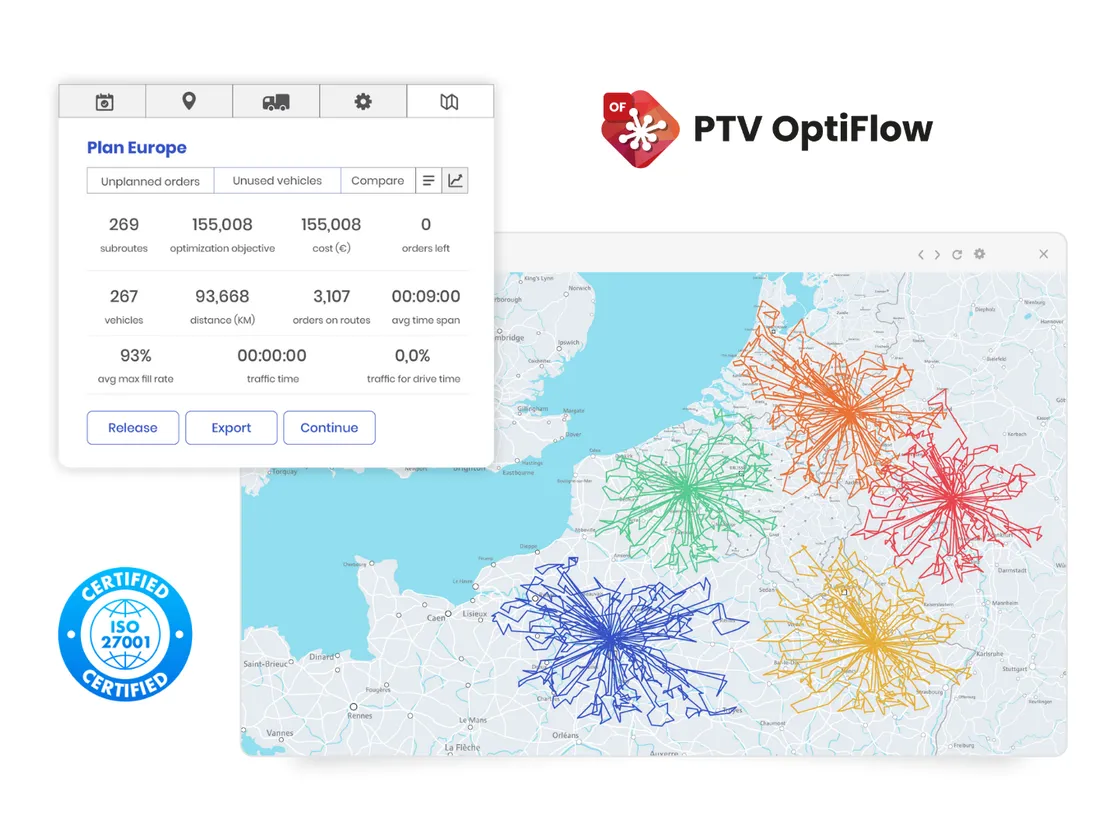
What it does well
- Plans automatically. Orders, vehicles and rules go in. A full plan comes out.
- Optimizes for your definition of cost. You set what counts, such as cost per kilometer, hour, stop or overtime.
- Treats rules as hard or soft. A hard rule must hold. A soft rule can bend at a cost you set.
- Plans around traffic. Time dependent traffic models are based on historic patterns.
- Handles volume. Up to 10,000 orders can be optimized in a single plan.
- Helps with bigger decisions. You can simulate changes to fleet size, depots and demand.
How you can use it. As a planning application, through PTV Mira, a conversational assistant where you ask questions and it runs real optimizations, or as an API engine through PTV Developer.
A real world example
Distrilog, a Belgian logistics provider with 350 vehicles, used PTV Route Optimiser ST. Planners built a first plan and then adjusted it by hand for customer and driver preferences.
After a pilot with both systems running side by side for about six weeks, the rest of its distribution planning moved to PTV OptiFlow in stages. The results: fewer kilometers and driving hours in the plans, and predicted arrival times that line up much more closely with actual ones.
“The planners’ jobs have actually become easier,” says Julie Dierckx, Transport Manager at Distrilog.

Want to see how other customers describe the change? Read what customers gain from making the switch.
As operations grow larger and more complex, with more stops, more depots and more rules to juggle, automatic planning becomes the natural next step. The best way to find out what it would do for you is to learn how a proof of concept works, which is exactly what we cover in what to expect with a PTV OptiFlow proof of concept.