

Delivery networks are always a challenge to manage. Things become even tougher when your delivery network design is not aligned with demand, service promises and operating costs. A depot may reach capacity, a new region may add distance, eCommerce growth may increase stop density, and customer delivery windows may become tighter than the original network was designed to handle. Planners often try to get by with manual fixes, but that only works for so long.
That is when an effective logistics network redesign can make a real difference in terms of cost-to-serve, service reliability, fleet utilization and long-term resilience. With delivery network optimization, your logistics teams can start modelling how different network choices affect daily routes, depot allocation, vehicle use, emissions and service levels.
What Is Delivery Network Redesign?
Delivery network redesign means changing the structure of your distribution operation so it holds up to current demand, service commitments and operational constraints. It can include changing depot locations, redesigning delivery territories( also known as sectorization) adjusting your fleet mix, adding cross-docks, rethinking consolidation logic or deciding which customers should be served from which fulfillment location. For logistics-heavy industries like retail, CEP, FMCG and transport, these choices have a major impact on workloads and costs.
It’s important to remember that there is a difference between everyday operational planning and strategic network design. Operational planning answers daily questions such as which orders should go on which routes, which vehicles should serve which stops and how planners should respond when demand changes. Strategic network design answers bigger questions about depot structure, regional coverage, fleet requirements and the long-term balance between cost, service and capacity.
Both are closely connected. Even if your network design looks efficient in theory, you might still wind up with routes that are hard to execute if your planners don’t have the tools to account for constraints like time windows, truck attributes, depot capacities, driver rules or road restrictions. Good supply chain network planning relies on optimization approaches that connect network design decisions with executable route plans, using both network optimization and route optimization software.
Most companies still separate strategic planning from daily routing, which creates a disconnect between network design and what planners can actually execute.
Signs Your Delivery Network Needs Redesign
1. Rising transportation and fulfillment costs
Rising costs often mean your network no longer matches how you deliver. Routes may cover too many miles, depots may serve the wrong areas or your territories may push too much work onto some teams while others have room.
When performing a cost-to-serve analysis, look beyond your total transport spend. Check which regions, customers, delivery windows, order types and fulfillment flows cost the most. That helps you see whether your team needs better daily route optimization software, a wider network redesign or both.
Also read: Why transport costs are rising in 2026 and how route optimization reduces them
2. Service levels becoming inconsistent
Late deliveries, missed time windows, last-minute route changes and uneven depot workloads often point to a network problem. Your urban routes may run overloaded while nearby areas still have room. Your stores may also see very different delivery reliability from one region to the next.
Route optimization software helps your team see whether the issue comes from routing, depot assignments, territories or vehicle choices. That is important because more trucks will not fix a network where depots, delivery areas or service rules no longer fit the job.
3. Rapid business changes
Fast growth can make an old network outdated. More SKUs, more online orders, new regions, higher returns volumes and city access rules all change how your team needs to plan. A network that once handled store deliveries well may struggle with B2B, B2C and returns at the same time.
The real question is simple: can your network still meet delivery promises without pushing up costs or creating more manual planning effort?
When new channels or service models keep creating daily exceptions, your organization needs to review the network instead of patching routes by hand.
4. Fleet imbalance and underutilization
Fleet imbalance often starts with how work gets assigned. One depot may run short of vehicles while another has trucks standing by. Some routes may need larger vehicles, while others could run better with smaller vans, EVs or vehicles with the right city access.
Start with the network, not just the fleet list. Your issue may not be the number of vehicles, but how your software assigns orders to depots, territories and route types. Buying more vehicles can raise the total cost without fixing the planning problem.
5. Too much manual work or growing planning complexity
If your network is too complex for your current software, your teams have to do more of the planning by hand. Your planners may move orders between depots, rebuild routes around time windows, redraw territories from experience or work around vehicle limits the system cannot handle.
That slows your team down and makes planning harder to repeat. Experienced planners spend too much time fixing plans, while new planners need longer to learn the hidden rules. Good planning software makes constraints clear, testable and easier to use across teams.
In this example, an AI-supported logistics analysis using PTV Mira explores how different depot configurations affect cost, distance, and route efficiency in a real-world network. Instead of relying on assumptions or static averages, multiple scenarios are tested and compared—revealing which locations add value, and which can be removed without impacting service.
6. Simple software no longer keeps up
Businesses with straightforward delivery operations often rely on spreadsheets alongside free route planning tools like OpenRouteService, OSRM (Open Source Routing Machine) or GraphHopper, as well as a basic transportation management system (TMS). These solutions can work well for low delivery volumes, stable territories and relatively simple routing needs. But these tools are ineffective when your team needs to compare depot options, plan across several depots, include truck limits, manage delivery windows or test changes before making them.
Your software should match the decisions your planners and transport leaders need to make. For example, your team may need to compare closing a warehouse, adding a cross-dock, changing territories or adding EVs to part of the fleet. A spreadsheet can show an average mileage change, but it cannot reliably show what those choices do to route time, service levels, vehicle load, emissions and cost per delivery.
Why Optimization Is Essential for Delivery Network Redesign
Delivery network redesign is difficult because every network decision affects several operational outcomes at once. Closing a warehouse may reduce fixed cost but increase stem miles, route duration and driver pressure. Adding a micro-hub may improve urban delivery reliability but add handling cost and new inbound planning requirements. Changing territories may improve workload balance but affect customer cut-off times and delivery time windows.
A data-driven optimization approach is essential because it brings real-world constraints into the decision model. A credible delivery network optimization process should include depot capacities, delivery windows, vehicle profiles, truck restrictions, loading and unloading times, route duration, driver regulations, toll costs, emissions, low-emission zones and customer service commitments. For multi-depot optimization, it should also compare which depot should serve which demand and how that decision changes route performance across the network.
This is why spreadsheets often fall short for network simulation logistics teams can trust. They can calculate totals and averages, but they struggle to show how choices interact across thousands of orders, stops, vehicles and constraints. Optimization connects the strategic question, such as whether to add a regional hub, with the operational answer, such as whether the resulting routes can be executed reliably by the available fleet.

Many logistics teams recognize inefficiencies in their network but struggle to quantify what improvements would actually mean in terms of cost and performance. Our route optimization savings calculator helps you estimate potential savings based on your own operation using inputs such as number of stops, vehicles, depots, and planning complexity.
How to Redesign Your Delivery Network
Step 1: Collect and clean your operational and geographic data
Start with the data your planners use every day. Pull together your orders, delivery addresses, depot locations, vehicle types, route plans, volumes, weights, service times, time windows, costs, drive times and delivery results. Add the problems your team keeps fixing by hand, such as failed deliveries, access limits, waiting time, driver-hour issues and last-minute route changes.
You also need proper map data. Delivery vehicles do not move in straight lines. They use real roads with traffic, tolls, truck limits, low bridges and city access rules. Your data does not need to be perfect, but it must be clean enough to show how your network runs today and what could change.
Step 2: Map real constraints
List the rules your planners have to work around. These may include vehicle capacity, truck type, driver hours, depot opening times, loading bays, customer time windows, chilled goods, hazardous goods, city restrictions, EV range and charging points. Truck height, weight, length and axle load can also decide which roads your vehicles can use.
This step often shows why the network is under strain. The issue may not be too many orders. It may be orders in the wrong places, tight delivery windows, the wrong vehicle type for certain areas or too much manual work needed to make routes possible.
Step 3: Build scenarios
Use route optimization software to compare real options, not guesses. Your team can test what happens if you close a depot, add a cross-dock, redraw delivery zones, open a new hub, add EVs, change delivery days or move from national to regional delivery.
Each scenario should answer one clear question. For example: “Can we serve this region from two depots instead of three?” or “What happens if we add EVs to inner-city routes?” Decide what success looks like before you run the model, such as lower cost per stop, fewer miles, better on-time delivery or fewer manual fixes.
Step 4: Simulate “what if” modeling at scale
A network change rarely affects just one route. Moving depot work can change thousands of stops. A tighter delivery window can mean more vehicles. A new hub may cut mileage but add extra handling.
An advanced route optimization software, such as PTV OptiFlow helps your team test these changes before you spend money or change live routes. This is especially important when you run several depots, because depot choice, territories, routes, vehicles and driver hours all affect one another. Without proper testing, a plan can look good on paper and still cause problems every day.
Step 5: Compare outcomes using KPIs
Do not judge each option by transport cost alone. Compare cost per stop, cost per unit, route time, empty miles, vehicle use, truck numbers, on-time delivery, CO₂, planner workload and manual fixes.
Also check the hidden costs. A cheaper network may create more overtime, failed deliveries, customer complaints or manual planning. The better option is the one your team can run reliably, not just the one with the lowest headline cost.
Step 6: Choose the optimal network design and validate operational feasibility
The best network is not always the cheapest one. Choose the design that gives your team the best balance of cost, service, CO₂, driver rules, depot workload and day-to-day planning effort.
Before rollout, test the plan with your planners, depot managers, transport managers and customer teams. Check the routes, loading process, driver rules, customer needs, common exceptions and timing. You can lower risk by starting with one region, one depot group or one route type before rolling the new design out across your wider network.
Common network redesign scenarios
Closing or consolidating warehouses
Closing a warehouse can lower rent, labor and building costs, but it can also push vehicles farther from customers. Your team may face longer routes, more driver hours and fewer options when orders change late in the day.
Delivery network optimization software with scenario planning helps you test the full picture before you make the move. You can compare building savings against extra miles, longer route times, service risk and higher cost per stop.
Adding cross-docks or micro-hubs
Cross-docks and micro-hubs can help in busy urban areas where traffic, access rules and tight delivery windows put pressure on your routes. They can move goods closer to customers and make last-mile delivery easier. They also add extra handling, inbound planning and handover work. Network simulation logistics helps your team check whether the better last-mile routes are worth the added step.
High parcel density and strict delivery windows make territory balance and route feasibility especially critical in urban and CEP environments.
Introducing EVs
EVs change how your team plans. Range, charging time, payload, depot charging space and route length all affect which jobs an EV can handle. A network that works for diesel trucks may need new territories, new charging schedules or different depot assignments for EVs. Fleet optimization helps you see which routes can switch now and which ones need changes first.
Tools such as PTV EV Truck Route Planner can support this process by simulating realistic multi-stop routes, energy consumption, and charging scenarios under real-world conditions like weather, payload, and road restrictions.
Regional versus national distribution
Regional distribution can cut miles and bring your depots closer to customers. But it may also mean more stock in more places, tighter depot planning and more handovers between teams. National distribution can make stock easier to manage, but it often creates longer transport legs and more risk when delays hit one main site. Distribution center network design helps your organization compare both options using real orders, real routes and real service targets.
CEP territory redesign
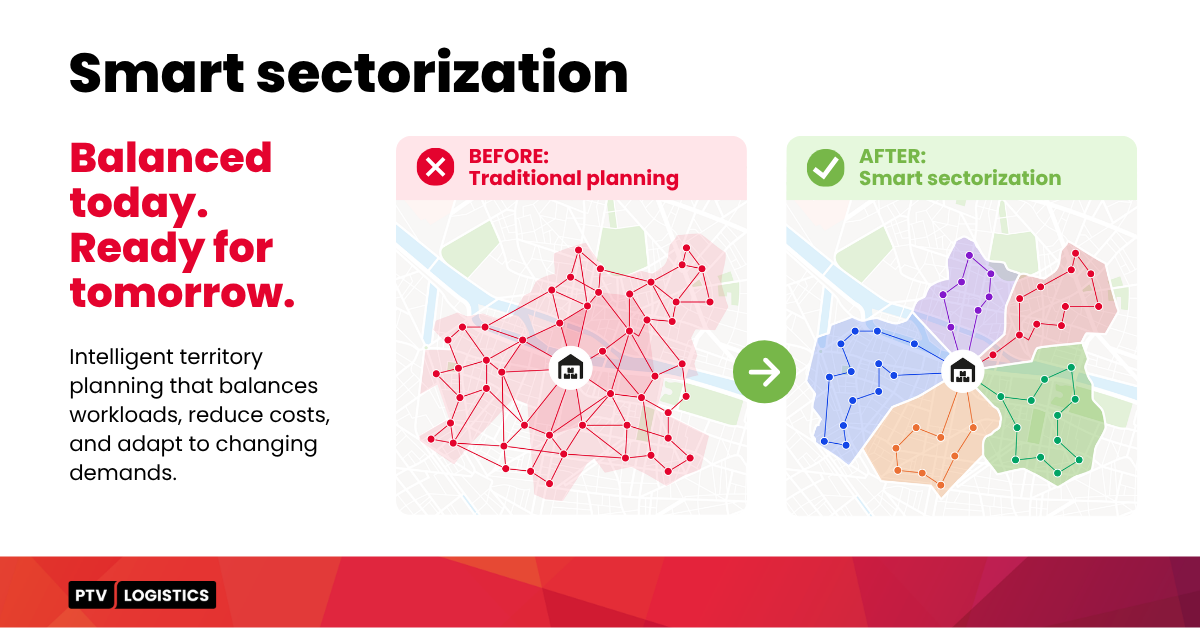
Parcel routes can change fast. The customer base grows, online orders increase, delivery promises get tighter and city rules can change which vehicles can enter certain areas. Transportation network optimization helps your planners redesign delivery territories (sectorization) so each depot gets a fair workload. It also helps balance route density, service levels, driver hours and vehicle needs across delivery zones.
Peak season and promotion planning
A sales peak can also expose weak spots in your network. Your depots may run out of space, your drivers may hit time limits or your delivery zones may no longer match order volume. Logistics scenario planning helps your team test peak demand before it arrives. You can adjust temporary fleet capacity, territories, fulfillment rules and delivery promises before your planners have to fix problems by hand.
How PTV Logistics supports delivery network optimization
Multi-depot and multi-leg modeling with PTV OptiFlow
Multi-depot optimization is a complex task, because you have to account for so many variables: orders, depots, routes, vehicles and time windows all affect one another. The closest depot is not always the best depot. Your planners need to know which depot can serve each customer on time, with the right vehicle and at the right cost.
PTV OptiFlow gives your team a way to test those choices at scale. Your planners can compare depot assignments, rebalance delivery areas, improve daily route plans and see how logistics network redesign would affect real planning work.
Real road rules and truck limits
Delivery network design needs real road data. Straight-line distance and car travel times can make a plan look better than it is. Trucks face weight limits, height limits, tolls, access rules, low bridges and roads they cannot use. A good route optimization software helps your team plan with those limits included. That gives you more realistic drive times, route distances, emissions and delivery costs before you choose a new network design.
Scenario testing at scale with PTV OptiFlow
Scenario testing only helps if it can handle your real order volume. Your team may need to compare depot changes, new territories, different fleet choices or new delivery frequencies across thousands of stops. PTV OptiFlow helps your team test these options with real route plans rather than averages. You can see how each choice changes miles, vehicle needs, CO₂, service levels and planner workload.
APIs and data connections with PTV Developer
One of the main obstacles for effective network planning is siloed and fragmented data. Your order data and customer details may be spread out across an OMS, WMS, TMS, customer portal, analytics tool or internal planning system. PTV Developer gives your team APIs to connect all your systems into a single overview: routing, optimization, geocoding, matrix routing, maps, ETAs, truck restrictions and emissions. This helps your organization add planning logic to the software you already use instead of rebuilding the whole setup.
Planner-friendly workflows
Tools for route optimization and network planning should help your planners make better decisions, not pile extra work onto them. Planners benefit most from tools that provide clear recommendations, simple comparisons and the ability to test scenarios without waiting for a specialist IT team every time. User-friendly software makes logistics modeling tools easier to adopt. Your team can start with one depot group, one region, one route type or one recurring problem. Then you can prove value early and build confidence before expanding.
Connecting network design to daily operations
A new delivery network plan only helps if your team can easily stick to it. The design must connect to real depots, routes, vehicles, driver rules, customer promises and planning software. PTV OptiFlow helps your teams compare delivery network design choices in a way that planners can use. Tools like this help you go from scenario testing to a smoother rollout with better KPI tracking and far less manual planning and admin.
ROI: What companies gain from optimization-led network redesign
Delivery network optimization allows teams to test structural decisions such as depot allocation, territory design and fleet usage against real routing constraints before making costly changes. Your team can check which depots, regions, customers, delivery windows and order types cost the most. That makes cost-to serve analysis logistics much more practical.
It can also improve delivery reliability. When plans include real time windows, depot limits, driver rules and vehicle constraints, your routes become easier to run. That helps reduce late changes, missed windows and daily firefighting.
Another upside can be lower CO₂ emissions. Network choices affect miles, empty runs, fleet use and EV readiness. With transportation planning software, your team can compare emissions next to cost and service instead of treating sustainability as a separate report.
Lastly, your planners gain more time for complex, strategic tasks instead of flipping through different systems and spreadsheets. If you have route optimization software handling repeatable checks and scenario comparisons, your planners spend less time rebuilding routes by hand. They can focus on exceptions, better decisions and even better planning.
Ready to rethink your delivery network?
If your business is dealing with rising costs, patchy service, vehicles in the wrong places or planners spending too much time fixing routes by hand, it may be time to think about when to redesign your delivery network. These signs often show that your depots, territories, fleet and delivery promises no longer match the work your team handles every day.
Delivery network optimization gives your team a practical way to test changes before you spend money or disrupt live routes. You can compare constraints, scenarios, KPIs and route plans, then choose a design your planners can actually run.
A good place to start is one clear question: does your depot structure still fit demand, are your territories still balanced or can your fleet do more without hurting service? From there, supply chain network planning software can help your team compare the options, check the trade-offs and choose a network design that fits the operation you need next.